The problem
Editing HTML usually means writing in one window and checking the result in another: save, switch to the browser, refresh, find your place again. Over hundreds of lines that friction adds up, and it's easy to lose track of which change did what.
The online playgrounds that solve this want an account, keep your code on their servers, or can't open the actual files on your disk. I wanted something that edits real files, shows the result instantly and needs nothing installed.
What I built
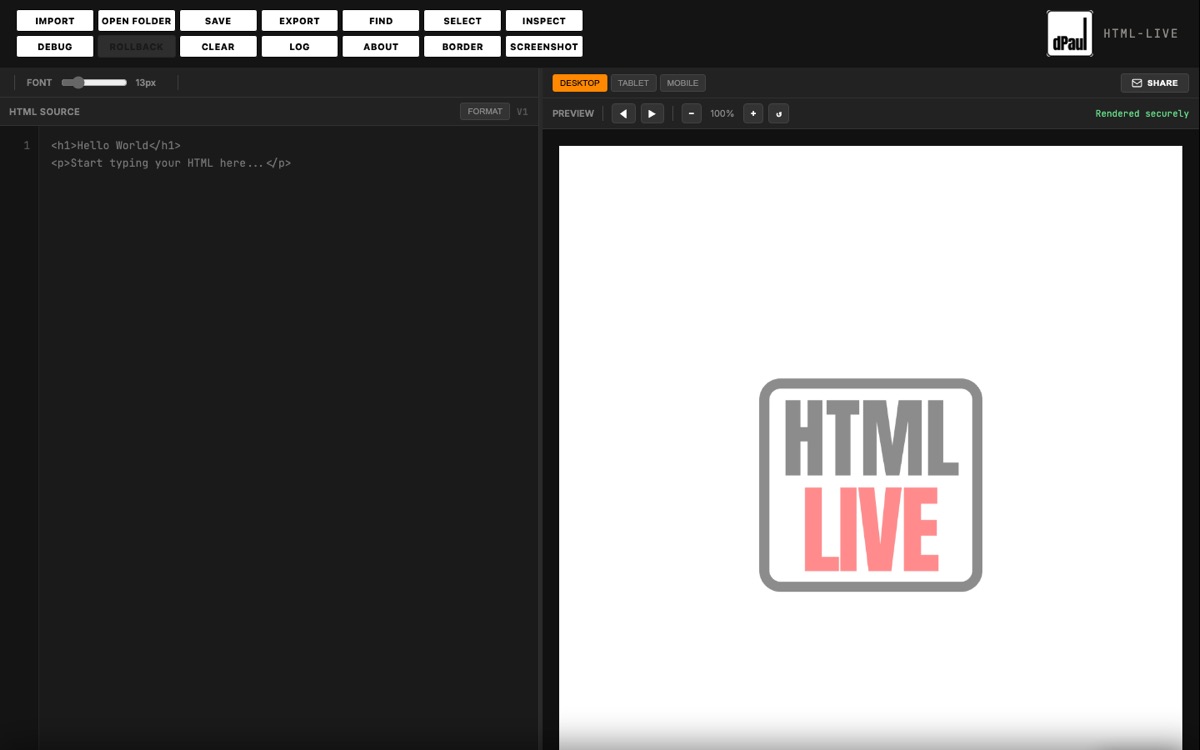
- Live preview that re-renders on every keystroke, with desktop, tablet and mobile widths and zoom.
- Opens and saves real files on disk through the File System Access API, with a read-only fallback in browsers that don't support it.
- Open a whole project folder: CSS, scripts, images and internal links resolve, with back and forward in the preview.
- Find and replace with regex, an inspect mode for clicking elements in the preview, version rollback, and export as raw, formatted or minified HTML.
- A debug panel that runs HTMLHint and badges the number of issues.
Process
HTML-Live is on version 4. Each version came from using the previous one on real work, mostly this site and Carbonography, and noticing where I slowed down. Folder support came when single files stopped being enough; rollback came after losing work once too often.
Wiring in HTMLHint was the first time I had to read an API's documentation properly end to end, because the feature simply wouldn't work otherwise. The toolbar grew one button at a time, which is something I'd like to revisit: grouping the controls by task would make it easier to scan.
Result
HTML-Live is live as part of the dPaul Software subscription. It runs on desktop and laptop browsers.
Work with me
Got a site, a tool or a video that needs making?
I take on freelance projects and I'm open to UX/UI and front-end roles. Tell me what you need.